
Understand HISE Metadata and Data Flow
Last updated 2026-06-04At a Glance
HISE metadata moves through four phases: source metadata definition, metadata ingest, pipeline processing, and aggregation into read-optimized snapshots (materialized views). The core cohort, subject, sample, and specimen structure is derived from SLIMS, a laboratory information management system (LIMS) used at the Allen Institute. Metadata ingest and pipelines add clinical and file metadata. Read-optimized snapshots combine that information into records you can query through the SDK and Advanced Search. This context helps you understand where metadata comes from, how it connects across samples and files, and which view to use when you’re looking for study context versus specific analysis outputs.
When to Use This Feature
Use this document when you want to understand how metadata is organized in HISE before you ingest data, configure pipelines, or query results through the SDK or Advanced Search. This model helps you see how LIMS entities, uploaded clinical metadata, and pipeline outputs come together in the SampleStatus and FileDescriptor views you rely on for analysis. Use this document to do the following:
Decide whether to start from a sample-centric view like
SampleStatusor a file-centric view likeFileDescriptor.Get a mental picture of how cohort, subject, sample, specimen, lab results, and derived files are linked.
Interpret batch IDs, specimen records, visit metadata, and pipeline outputs in context.
Understand why a field, file, or result appears in one view but not another.
Build more accurate queries by knowing which metadata originates in the LIMS, which comes from uploaded clinical metadata, and which is created during pipeline processing.
Overview
HISE brings together metadata from multiple sources so you can search and interpret your data in one place. The core study, subject, sample, and specimen structure comes from the LIMS. Uploaded clinical metadata adds EMR, survey, and lab results data. File ingest and downstream pipelines add file metadata and derived outputs.
This means metadata in HISE is not just a single table. It moves through a flow: source metadata is defined in systems like the LIMS or uploaded files, becomes structured HISE records during ingest and processing, and is then combined into views built for sample-centric or file-centric searches. Data flows through HISE in four stages: source metadata definition, metadata ingest, pipeline processing, and aggregation into read-optimized views, as shown in the image. For details, select a tab below.
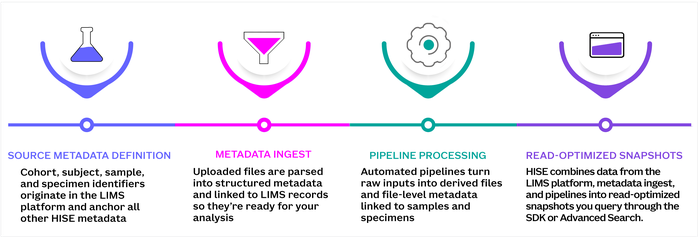
Stages of HISE Metadata and Data Flow
Source metadata definition
In this stage, HISE defines metadata based on its origin. The LIMS platform defines cohort, subject, sample, and specimen structure and tracks these entities throughout their lifecycle, from receipt to final disposition. Nonresearch lab data and clinical events originate in EMR systems, and each research team defines a project‑specific data dictionary that determines which additional metadata fields apply within their study. In the next stage, metadata ingest, these originating sources are read field by field, and values are routed into collections such as EMR metadata, survey metadata, and lab results.
NOTE: Some metadata originates only in uploaded files (for example, surveys or lab‑results spreadsheets) and is introduced during metadata ingest, rather than being pulled from the LIMS or an EMR. For instructions on uploading that kind of metadata to HISE, see Use Watchfolders to Ingest Data (Tutorial)
.
This hierarchy gives your data context:
A subject belongs to a cohort.
A sample represents a collection event for that subject.
A specimen represents physical material linked to that sample.
Analysts typically link data by cohort, subject, and sample, and then filter by modality to focus on a specific measurement type. A modality is the type of data produced for a sample or specimen, such as sequencing, imaging, flow cytometry, or survey results. One subject can have many samples, and each sample can produce data in multiple modalities.
In HISE, these cohort, subject, sample, and specimen relationships show up in records such as SampleStatus, which includes cohort and subject attributes, a single sampleGuid and sampleKitGuid, and many linked specimen records with specimen GUIDs, specimen types, statuses, and processing metadata. HISE does not expose every level or every field that exists in the LIMS. Instead, it pulls in a subset through a default mapping scheme, with the option to define custom schemes when additional fields are needed. That distinction matters because it explains why you can see certain sample and specimen concepts in HISE while still needing the LIMS for finer-grained lab detail.
Metadata ingest
Metadata ingest and processing begin when you drop a file into a watchfolder. That action creates an ingest receipt and a file metadata object that records the file as something HISE has received and can process. From there, HISE determines which scheme or data dictionary applies to the file and uses it to interpret the file contents so your metadata lands in the right fields without manual cleanup. Each project's data dictionary is defined by the research team and lists the metadata fields relevant to the study. Collectively, these fields become a project-specific ingest scheme. For clinical metadata, HISE does more than store the uploaded file. It parses field–value pairs and maps recognized fields into domain‑specific collections, such as EMRData, SurveyData, and LabResults. This design organizes clinical metadata by meaning and source, rather than treating it as a generic attachment.
Those records are then linked back to the LIMS‑derived hierarchy. A SampleStatus record includes cohort information, subject demographics, visit metadata such as drawDate and daysSinceFirstVisit, a list of specimens, lab result values, and flags such as hasLabResults. That aggregation is possible only because ingested metadata is tied to shared identifiers across cohort, subject, sample, and specimen records.
Pipeline processing and file descriptors
After metadata is ingested and linked to the LIMS hierarchy, HISE uses file attributes and file types to trigger downstream pipelines. This is the stage at which your uploaded data starts producing analysis outputs, such as flow cytometry results, scRNA-seq outputs, ATAC-seq outputs, and other derived files.
As pipelines run, HISE creates new file metadata for each output. Those records can include details such as file type, batch ID, availability, timestamps, panel IDs, and pool IDs. This step turns pipeline outputs into structured records that HISE can track, connect to samples and specimens, and prepare for search. Some of those derived files are then rolled into FileDescriptor, which is the file-centric view of the data. A FileDescriptor record brings together the output file and its surrounding context, such as cohort, subject, sample, specimen, batch, and pool information, so you can understand not just what a file is, but where it came from and how it relates to the rest of your data.
Read-optimized snapshots
After HISE ingests metadata and processes assay pipelines, it combines those records into read-optimized snapshots. These views are the final stage in the flow and the main way you interact with metadata in HISE through the SDK and Advanced Search.
SampleStatusis the sample-centric view. It combines cohort and subject context, visit metadata, specimen records, lab results, experiment information, and batch participation into one record.FileDescriptoris the file-centric view. It represents a specific file together with the sample, specimen, subject, cohort, and batch context you need to interpret that file.
This is the stage that makes metadata useful for analysis. If you start with a sample and want to know what data and experiments are associated with it, SampleStatus gives you that view. If you start with an output file and want to understand what sample, specimen, or batch it came from, FileDescriptor gives you that view. Read-optimized snapshots bring together data from multiple sources so you don’t have to reconstruct those relationships yourself.
Related Resources
Create, Edit, or Delete Metadata